AI co-editor, built in — powered by Claude

The whiteboard that draws with you

Describe a diagram and get a real, editable board in seconds. Then drag, draw and present it with your team — while AI-Noddle edits right alongside you.

Start free

free forever · no card imports draw.io & Mermaid

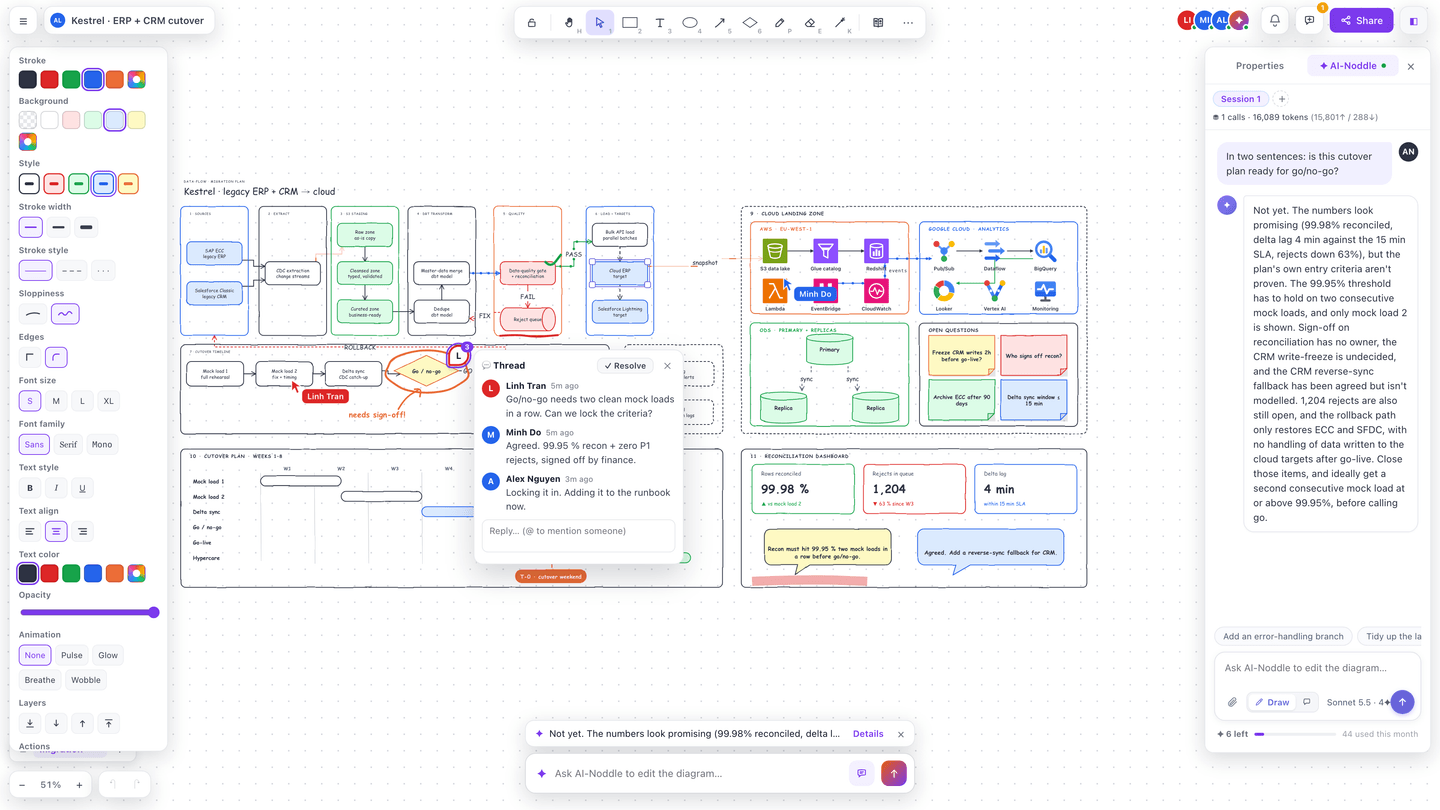
Noddle Board editor with a dense ERP and CRM cutover board: data-pipeline lanes, AWS and Google Cloud frames, a cutover Gantt plan, sticky notes and pen ink, a comment thread between three teammates, collaborator cursors, and the AI-Noddle panel (Sonnet 5.5) answering whether the plan is ready.

Fits the tools you already use

  • Imports draw.io & Mermaid
  • Exports SVG · PNG · GIF
  • Slack & Microsoft Teams webhooks
  • Embed in Notion, Confluence, any page
  • Open-source edition (MIT)
  • MCP for AI agents

a quick tour

Everything a diagram needs. Plus an AI that draws.

✦ AI co-editor

Ask, and watch it draw

Type what you want in the AI bar. AI-Noddle edits the real board — adds shapes, reroutes arrows, animates flows — and any change rolls back in one click.

AI-Noddle is asked to animate the request path on an AWS architecture board, and the edges from Users to the ECS services start flowing.
  • Text or Mermaid → board ✦

    Describe a flow or paste Mermaid. You get editable shapes, not a picture.

  • Sketch → board ✦

    Upload a whiteboard photo and get clean, movable shapes back.

  • Rollback & Ask mode ✦

    Undo any AI edit as one step, or switch to Ask for advice without touching the board.

Library

Real building blocks, not blank boxes

Drag from ten packs of ready pieces — flowcharts, wireframes, mobile screens and 100+ AWS, Azure and Google Cloud icons. Arrows snap on, route themselves and animate the flow.

Kinesis, S3 and Athena are dragged from the Library onto a busy AWS architecture, wired with snapping arrows and animated from the style panel.
  • 100+ cloud icons

    AWS, Azure and Google Cloud services, grouped into clear categories.

  • Smart arrows

    Side-aware orthogonal routing with segments you can drag and keep.

  • My library

    Save any selection once and reuse it on every board.

Templates

60 templates to start from

Architecture, flowcharts, kanban, roadmaps, wireframes, org charts, ERDs and retros. Every one is fully editable — and AI-Noddle can adapt it to your project.

Browsing the template gallery by category and opening a kanban board template.
  • Import draw.io

    .drawio files come in with their pages, groups and labels.

  • Multi-page boards

    Page tabs keep a whole project on one board.

  • Version history

    Every save is a snapshot you can restore for the whole room.

Try it on a real board

Start free 10 boards + 25 ✦ a month, free forever

Live together

One link, everyone on the same board

Live cursors and presence, comment pins with @mentions, and per-person undo that never rewinds a teammate’s work.

Two people move kanban cards on the same board at once; one leaves a comment that mentions the other.
  • Comments & @mentions

    Pin a thread to a shape, an arrow or a spot. Mentions land in an inbox.

  • Private by default

    Invite by email as viewer or editor, or turn on a share link.

  • Teams & SSO

    Shared team spaces, roles and Google / any OIDC sign-in on Team.

Pen · laser · present

Mark it up, then present it

Circle what matters with a pen or highlighter, then turn pages into slides and point with a laser — straight from the board.

A card is circled with the pen and a comment is pinned to it.
Present mode opens the board fullscreen and a laser pointer traces the request path.
  • Pen & highlighter

    Pressure-style ink that scales with the shapes it marks.

  • Laser pointer

    Press K while presenting; the trail fades on its own.

  • Animated exports

    Flowing edges bake into a seamless looping GIF.

Share & embed

Put the live board where people already work

Board links show a preview card when pasted into Slack or Microsoft Teams. Embed live boards in Notion, Confluence or any page via iframe or embed link — or hand out private embed links that expire.

The Share dialog: inviting a teammate by email, turning on the share link and copying the embed code.
  • Slack, Teams & webhooks

    Send board activity to Slack, Microsoft Teams or any webhook — paste your own webhook URL.

  • Export anything

    SVG, PNG, GIF, Mermaid, Board JSON or a PNG deck.

  • Cloud drive sync — coming soon

    Keep boards in the cloud drive your team already uses.

For AI agents

Your agents can edit boards too

A scoped API token is an agent’s identity. Agents edit boards via MCP (stdio + Streamable HTTP) or the public REST API — they list, create and edit boards under their own name, right there in presence.

$ claude mcp add --transport http noddle \
    https://board.noddle.dev/mcp \
    --header "Authorization: Bearer noddle_••••"

› Draw our checkout flow on a new board and
  leave a comment on the riskiest step.

✦ noddle · create_board  “Checkout flow”
✦ noddle · update_board  9 shapes, 8 arrows
✦ noddle · add_comment   on “Payment retry”
  • MCP — stdio + Streamable HTTP

    Works with Claude Code, Claude Desktop and any MCP client.

  • Public API v1

    REST endpoints with an OpenAPI reference.

  • Scoped, revocable tokens

    Read, write, comment or AI — grant only what an agent needs.

And more…

  • Team games — Draw & Guess, Trivia, Word Bomb
  • Animated edges: dash, dots, beam, pulse
  • Mermaid & Board JSON export
  • Keyboard-first tools (1–6, P, E, K)
  • Per-object undo that respects teammates
  • Public REST API with OpenAPI docs

From idea to board in three steps

  1. 1

    Describe or drop

    Type a sentence, paste Mermaid, pick one of 60 templates or upload a sketch.

  2. 2

    Shape it together

    Drag Library pieces, let arrows route themselves, mark it up — with your team live.

  3. 3

    Share, embed, present

    Send one link, embed the live board, or present the pages as slides.

Integrations

Plugs into your agents and your stack

Let Claude draw on your boards, ping Slack when they change, sign in with your company account, and script everything else over a real API.

MCP server

Listed on the official MCP Registry

Your AI agent works on boards as itself — lists and reads them, drafts new diagrams, updates shapes and arrows, browses versions and leaves comments. One line for Claude Code; any MCP client that speaks Streamable HTTP connects the same way.

terminal

$ claude mcp add --transport http noddle https://board.noddle.dev/mcp

--header "Authorization: Bearer noddle_…"

✓ noddle connected · 10 tools · boards as resources

list_boards get_board create_board update_board add_comment generate_diagram

dev.noddle/board remote, no install per-token scopes & rate limits

Webhooks → Slack & Teams

Board created, shared, commented or mentioned — post it to a channel or any HTTPS endpoint. HMAC-signed, retried, auto-paused when a target dies.

board.* · comment.* · mention.*

Single sign-on

One-click Google sign-in over OpenID Connect — no extra password to manage. Secure sessions, password reset and an audit trail come built in.

OIDC · Google

REST API v1

Read and write boards, pages and comments from scripts, Zapier or CI. OpenAPI docs, cursors, ETags and idempotency keys.

/api/v1 · OpenAPI

Embeds & link previews

Drop a live board into Notion or your docs, and shared boards unfurl with a real preview in Slack. Embed links are view-only and revocable.

oEmbed · OG cards

Scoped agent tokens

Give each bot or teammate script its own token: boards, comments, AI or usage scopes, an expiry date, and a one-click revoke.

boards:write · ai:invoke

Simple plans, honest limits

Start free, forever. Upgrade when your boards — or your team — outgrow it. Cancel anytime.

Free

For trying it and personal boards

$0 $0

forever · no credit card forever · no credit card

25 AI credits / month

  • 10 boards (multi-page)
  • Full editor — smart arrows, templates, stencils
  • Live collaboration
  • SVG & PNG export · draw.io import
  • MCP server & REST API access
✦ Most popular

Pro

For people who ship diagrams weekly

$20 $16

/ month

billed monthly · cancel anytime $192 billed yearly — save 20%

1,000 AI credits / month

  • Unlimited boards
  • Unlimited collaborators
  • GIF & deck export · embed mode
  • Full version history
  • Webhooks → Slack & Teams
  • 5× higher API & MCP limits

Team

For teams that live on shared boards

$25 $25

/ user / month

billed yearly · min 3 seats billed yearly · min 3 seats

1,500 AI credits / user / month

  • Everything in Pro, for every member
  • Shared team spaces & roles
  • SSO — Google / any OIDC provider
  • Owner-visible audit log
  • Team webhooks · 10× API & MCP limits

✦ credits pay for AI only: a text→board draft is 3 ✦, an AI edit 2 ✦, a sketch→board 5 ✦. Drawing, collaboration, import and export are always free. Prices in USD.

The editor is open source

The whole drawing engine ships as noddle draw (MIT): open a link, draw, share — no account. Noddle Board is the hosted workspace around it: your boards, your team, AI credits, and someone else running the servers.

Feature

noddle draw

open source

Noddle Board

hosted

In both — same engine
Full diagram editor — smart arrows, multi-page, animated edges, stencils Yes Yes
Realtime collaboration — live cursors, presence, comment pins Yes Yes
Import draw.io · export SVG / PNG / GIF / Mermaid / Board JSON Yes Yes
Version history on every board Yes Yes
Draw without an account — the board URL is the invite Yes accounts, private by default
AI co-editor, sketch→board & text→diagram ✦ bring your own key or free model pool ✦ credits included
Only in Noddle Board (cloud)
Accounts, private boards & access control No Yes
Dashboard, folders & “shared with me” No Yes
Teams & SSO (Google / any OIDC) No Yes
@mentions inbox across boards No Yes
Managed hosting, backups, support you run it — one Docker command Yes
Price free forever · MIT Free · Pro $20/mo · Team

Questions, answered

What are AI credits?

AI actions are metered in ✦ credits: a text→board draft costs 3 ✦, a co-editor edit 2 ✦ and a sketch→board conversion 5 ✦ at the default thinking effort (higher effort costs more and says so before you send). Drawing, collaboration, import and export never use credits, and a failed AI call is refunded.

Can I cancel anytime?

Yes. Downgrading keeps every board you made — you fall back to Free limits for new work. Boards export as SVG, Mermaid or Board JSON on every plan, so your work is never locked in.

Is my data sent to an AI model?

Only what you hand to an AI feature — the prompt, Mermaid or image you submit, or the board you ask AI-Noddle to edit. Normal editing and collaboration never call a model, and AI output is sanitized before it is stored or shown. Don’t paste confidential or personal data into AI prompts.

Can AI agents edit my boards?

Yes. Create a scoped API token, connect the Noddle MCP server (or call the REST API) and agents can read, create and edit boards as themselves. They appear in presence under their own name, so you always know who drew what.

How is it different from draw.io or Excalidraw?

draw.io is a powerful manual editor; Excalidraw is a lovely sketchy canvas. Noddle Board combines a real diagram engine — smart arrows, cloud stencils, multi-page boards, version history — with an AI that edits the board in the room with you. It imports your draw.io files, so trying it costs nothing.

Can I self-host it?

The editor is open source (MIT) as noddle-dev/noddle-draw: one docker compose up gives you the full anonymous board with bring-your-own-key AI. Accounts, teams, SSO and included ✦ credits are the hosted layer at board.noddle.dev.

Your next diagram is one sentence away

Describe it, drop a sketch or pick a template — then make it right, together. Pick your door:

Hosted workspace

Noddle Board

board.noddle.dev

Private boards, teams & SSO, ✦ AI credits included. Free forever for 10 boards — no credit card.

Open source · MIT

noddle draw

draw.noddle.dev

Same editor, no sign-up — open a link and draw. AI with your own key or the free model pool, or self-host it with one Docker command.

Made by

Noddle Board is built by a crew of five, with an AI as a co-editor. No growth team, no dark patterns — just the whiteboard we wanted to exist, shipped with honest changelogs. If something’s missing, tell us and watch it ship.

Sound on — the voice-over is AI-generated (synthetic voice), captions are burned in. Real product, sample data only.